Introduction
The right software can really make a difference in the efficiency of a business.
Whether you manage customers, sales, inventory, employees, accounting, projects, orders or internal workflows, software can become an important part of your everyday business operations.
One of the most common decisions businesses have to make is custom software or off the shelf software.
Do you buy off-the-shelf software that’s ready to use or develop software that’s designed with your business in mind?
There isn’t a universal answer for all organizations.
Usually off-the-shelf software is built for a wide market and has standard features that many organizations can use. Custom software is developed for a specific organization, group of users, or business requirement. Custom software is software that is developed for a specific user, function, or organization. That’s how IBM describes it. Commercial off-the-shelf software is built around a broader set of requirements and is sold commercially.
The right choice depends on your business processes, budget, timeline, needed features, integrations, scalability, security needs, and long-term plans.
In this guide, we’ll look at the difference between custom and off-the-shelf software, compare its advantages and limitations, discuss costs, and explain how to decide which approach suits your business.
Table of Contents
What Is Custom Software?
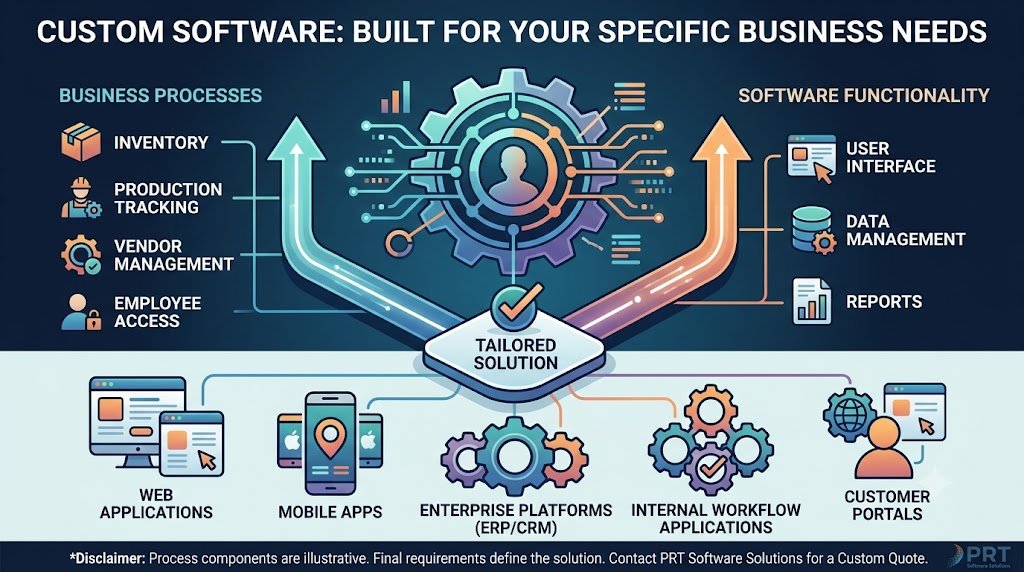
Custom software is software that is developed for a specific business, organization, process or group of users.
With custom development you design the software around your requirements, instead of having to change your business processes to fit an existing application.
For example, a manufacturing company may need a system that combines:
- Inventory management
- Production tracking
- Vendor management
- Employee access
- Purchase orders
- Sales orders
- Reporting
- Customer management
If the current software doesn’t accommodate the needed workflow, a business may decide to build its own.
Custom software can be developed as:
- Web applications
- Mobile applications
- Desktop applications
- Enterprise platforms
- CRM systems
- ERP systems
- Business management software
- SaaS products
- Customer portals
- Internal workflow applications
The main feature of custom software is that its functionality is built on specific requirements, not on a general market.
What Is Off-the-Shelf Software?
Packaged software is a ready-made software product intended for a wide range of users.
Instead of creating the software from scratch, businesses purchase or subscribe to an existing product and configure it to the features available.
Examples can include:
- Accounting software
- CRM platforms
- Project management software
- Email marketing platforms
- HR software
- Inventory applications
- Collaboration tools
- Customer support systems
- SaaS applications
The good news is that the software is already built and can often be deployed much faster than building a brand new application.Depending on the service model, the provider may also be responsible for maintenance, security, updates and infrastructure for SaaS products.
Custom Software vs. Off-the-Shelf Software: Key Difference
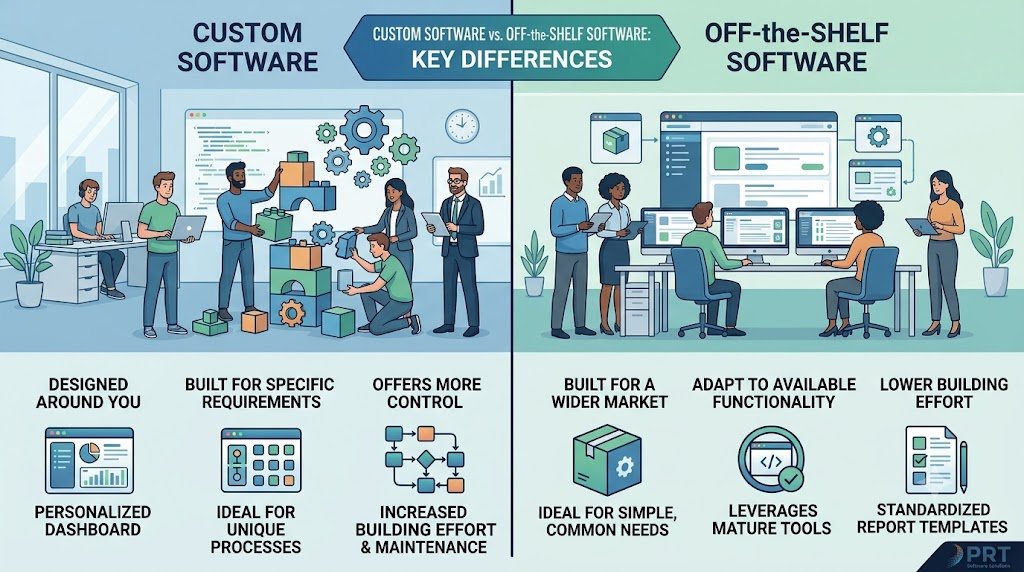
The easiest way to see the difference is this:
Custom software is designed around you.
Off-the-shelf software is built for a wider market and your business has to adapt to the functionality available.
None of these approaches is inherently better.
The best option depends on how well your needs align with existing software and how important customization is to your business.
If the needs of an organization are simple and common then an off-the-shelf product may provide all that is needed.
For businesses with unique work processes, specialized procedures or complex integrations, custom software can offer more control.
Microsoft’s guidance also suggests choosing tools based on the workload requirements and weighing the effort to build and maintain custom solutions against the capabilities of mature, off-the-shelf tools.
Custom Software vs. Off-the-Shelf Software Comparison
| Factor | Custom Software | Off-the-Shelf Software |
| Development | Built specifically for your requirements | Already developed |
| Customization | High | Usually limited to available options |
| Initial cost | Usually higher | Usually lower |
| Implementation | May take longer | Often faster |
| Scalability | Can be designed around future requirements | Depends on vendor/product |
| Integrations | Can be developed specifically | Depends on available integrations |
| Ownership | Can provide greater control depending on agreement | Usually controlled by vendor |
| Maintenance | Your team or development partner | Usually vendor-managed |
| Updates | Controlled by development team | Controlled by vendor |
| User experience | Can be designed specifically for users | Standardized |
| Flexibility | High | Depends on product |
| Time to launch | Usually longer | Usually shorter |
These are general characteristics rather than hard and fast rules. Pricing, ownership, customization and maintenance vary on the specific product, contract and development model.
Customization and Flexibility
One of the biggest differences between custom and off-the-shelf software is flexibility.
Custom Software
You can create custom software to suit your exact needs.
You can define:
- Features
- Workflows
- User roles
- Dashboards
- Reports
- Notifications
- Integrations
- Business rules
- Data structures
It is useful if your business has processes that are not a good fit for standard software.
For example, suppose your sales team follows a unique approval process before an order can be finalized.
A custom application can be designed to follow that exact workflow.
Off-the-Shelf Software
Ready-made software provides a predefined set of features.
You may be able to configure:
- Settings
- User permissions
- Workflows
- Templates
- Reports
- Integrations
But how much customization you can do depends on the product.
Some SaaS platforms allow for a lot of configuration, while others are relatively unflexible.
Cost: Custom Software vs. Off-the-Shelf Software
Cost is one of the most important issues.
Off-the-shelf software appears cheaper at first glance. You are purchasing an existing product, rather than paying for something to be built from scratch.
But the long-term cost should be taken into account, not just the initial price.
Custom Software Costs
Custom development can involve:
- Business analysis
- UI/UX design
- Development
- Testing
- Deployment
- Infrastructure
- Maintenance
- Security updates
- Future development
This can result in a higher initial investment.
But custom apps may take longer and cost more initially, Microsoft notes, but they give you more control over features, scale, security, updates, and integrations.
Off-the-Shelf Costs
Ready-made software may involve:
- Subscription fees
- Per-user charges
- Setup costs
- Premium feature costs
- Integration costs
- Support charges
- Data migration
- Customization expenses
Some SaaS products are sold on a recurring subscription basis, so costs keep coming in as long as the service is in use.
Think about the total cost of ownership not just the initial price.
Implementation Speed
If you need software fast, the competitive advantage of off-the-shelf software can pay off.
And because the product is already there, businesses can often set it up and get going without the waiting time of a full development cycle.
Custom software generally requires:
- Requirement analysis
- Planning
- Development
- Testing
- Deployment
This takes time.
Faster implementation is only beneficial when the software actually meets your requirements.
If employees have to find workarounds for missing functionality, the time saved in implementation could be lost to operational inefficiencies later.
Scalability
Scalability is the capacity of the software to support changing business requirements as the organization expands.
Custom Software
Custom applications can be architected around expected growth.
For example, you may plan for:
- More users
- More transactions
- More locations
- Additional departments
- New integrations
- New product categories
- Mobile applications
The architecture can be designed around those expectations.
Off-the-Shelf Software
The scalability of off-the-shelf software relies on the vendor and the product.
Some existing platforms can support large organizations and heavy use.
You still depend on the product’s available plans, features, architecture and roadmap.
Before selecting an off-the-shelf platform, check its:
- User limits
- Data limits
- API capabilities
- Integration options
- Enterprise plans
- Storage
- Performance
- Upgrade options
Integration With Existing Systems
Modern businesses rarely operate with a single software application.
You may need your software to connect with:
- Payment gateways
- Accounting systems
- CRM platforms
- ERP systems
- Email platforms
- SMS services
- Shipping providers
- Inventory systems
- HR platforms
- Marketing tools
Custom software gives you more control over the design of these integrations.
Off-the-shelf products might also provide APIs and integrations but you are limited to the capabilities that the product supports.
Before you select an off-the-shelf product, list all the systems it needs to communicate with.
Then verify that the integrations you want are actually there.
User Experience
User experience can have a direct impact on software adoption.
Custom Software
Custom development allows you to build interfaces that fit real users.
For example, a field worker might need a simple mobile interface with just a few important actions.
A manager may need a dashboard containing:
- Sales data
- Employee activity
- Performance metrics
- Reports
- Alerts
Different user roles can receive different experiences.
Off-the-Shelf Software
Off the shelf applications are designed for a broad customer base.
This means that the interface might have features you don’t need for your business, as well as features you do need, that it doesn’t have.
But there are plenty of off-the-shelf products that feature very slick interfaces that have been honed from experience with lots of users.
Security and Control
The security requirements vary widely depending on the kind of software and information being processed.
Custom development can allow organizations to define their own:
- Authentication
- Authorization
- User roles
- Data access
- Encryption approach
- Hosting environment
- Security controls
But custom software doesn’t automatically improve security. Security is also a function of architecture, implementation, testing, maintenance, and operations.
Many security and maintenance responsibilities may be managed by off-the-shelf and SaaS vendors themselves. IBM says SaaS providers usually handle application maintenance, security and updates, but customers are responsible for permissions and connected services.
The important question is not simply:
“Which is more secure?”
Instead, ask:
“Which approach can meet our specific security and compliance requirements, and who is responsible for maintaining those controls?”
Maintenance and Updates
Every software solution requires maintenance.
Custom Software
With custom development, maintenance may involve:
- Bug fixes
- Security patches
- Performance improvements
- Technology upgrades
- New features
- Infrastructure management
This can be done internally or with a software development company.
Off-the-Shelf Software
Typically, the vendor takes care of product updates and maintenance.
This reduces the technical work required from the customer.
But vendor-controlled updates can also alter features, interfaces, pricing or integrations.
You give up some control in return for the convenience.
Ownership and Vendor Dependency
Ownership is another important consideration.
With custom development, the contract can define rights to:
- Source code
- Documentation
- Designs
- Database
- APIs
- Custom features
It is based on the agreement on ownership arrangement.
Usually, the customer buys a license or subscription to off-the-shelf software, as opposed to owning the underlying software.
For SaaS apps, the platform is the provider, as is the development roadmap.
Before choosing either option, understand what happens if:
- The vendor shuts down the product
- Pricing changes
- A required feature is discontinued
- A required feature is discontinued
- You want to migrate to another platform
Business-Specific Workflows
This is where custom software can become particularly valuable.
Consider a company with a unique workflow that includes:
Customer request → Internal review → Department approval → Custom quotation → Manager approval → Production → Quality check → Delivery → Customer confirmation
If existing software cannot support this workflow, employees may need to use spreadsheets, email, messaging applications, and manual processes.
A custom system can bring these activities into one platform.
This can potentially reduce duplicated work and make business information easier to manage.
When Should You Choose Custom Software?
Custom software may be worth considering when:
Your business has unique processes
Customization is useful if your workflow is very different from the normal workflow in the industry.
Existing software cannot meet your requirements
If you’ve assessed the products on offer and still feel like there are features missing, then bespoke development could be the way to go.
You need complex integrations
If you want different internal & external systems to work together, you may need custom development.
Your software is part of your competitive advantage
If your technology supports a unique business model or service, custom development can offer more control.
You expect substantial growth
If you need a lot of flexibility then a custom architecture might be the way to go .
You need control over the user experience
You can build custom applications that are tailored to particular users and workflows.
When Should You Choose Off-the-Shelf Software?
Off-the-shelf software may make sense when:
Your requirements are common
You may find that the standard accounting, email, project management, CRM or collaboration functionality you need is already available from existing platforms.
You need to launch quickly
A ready-made product can often be configured faster than developing a new application.
Your budget is limited
For simple needs, it may be less expensive up front to buy off-the-shelf software.
You do not need extensive customization
There’s little point in creating a custom solution if the features on offer meet your workflow needs.
You prefer vendor-managed maintenance
The SaaS provider may manage updates, infrastructure and maintenance.
Microsoft’s engineering guidance recommends using mature off-the-shelf tools when they meet your workload requirements and specifically suggests considering the development and ongoing maintenance effort involved in building your own solutions.
Can You Combine Custom and Off-the-Shelf Software?
Yes.
Businesses do not always have to choose one approach for everything.
A hybrid strategy can combine:
- Off-the-shelf CRM
- Custom customer portal
- Existing accounting software
- Custom reporting dashboard
- Third-party payment gateway
- Custom business automation
This can allow businesses to use mature products for standard functions and develop custom software for areas where they have unique requirements.
This can help companies take advantage of mature products for standard functions and use custom software for areas where they have unique requirements.
The trick is to know where customization can really add value to the business.
Custom Software vs. Off-the-Shelf Software: Questions to Ask
Before making your decision, ask:
- What problem are we trying to solve?
- Are our requirements standard or unique?
- Does existing software meet most of our requirements?
- Which features are essential?
- Which features are optional?
- How quickly do we need the solution?
- What is our initial budget?
- What is our expected long-term budget?
- Do we need custom integrations?
- How many users will need the system?
- How much customization is required?
- What security requirements do we have?
- Who will maintain the software?
- Who owns the data?
- What happens if we want to change vendors?
- How important is control over the product roadmap?
- Will the software become a core part of our business?
- Do we expect our requirements to change significantly?
These questions will help take you from a build vs. buy discussion to a more pragmatic business decision.
Common Mistakes Businesses Make
Choosing Based Only on Price
The cheapest option isn’t always the best value for money in the long term.
Think about licensing, development, customization, integration, maintenance, training, migration, and support.
Building Everything From Scratch
Custom software is flexible, but building features that are already available in mature products can be an unnecessary cost and maintenance burden.
Microsoft recommends using proven, off-the-shelf tools when they meet the requirements of the workload, and only doing custom development where it adds real value.
Choosing Software Without Understanding Requirements
A business might buy a popular platform and find it doesn’t support critical workflows.
First, define the needs.
Ignoring Future Needs
Think about how your business could change over the next few years.
Forgetting Integration Requirements
Always identify the systems your new software needs to communicate with.
Ignoring Data Migration
If you are replacing an existing application, understand how historical data will be transferred.
Not Checking Vendor Support
Understand the provider’s support model, response times, update policy, and long-term roadmap.
How to Calculate the Real Cost
Instead of comparing only the purchase price, consider the total cost of ownership.
For Custom Software
Consider:
Development + Design + Testing + Infrastructure + Maintenance + Future Development + Support
For Off-the-Shelf Software
Consider:
Subscription/License + Setup + Customization + Integration + Migration + Training + Support + Future Subscription Costs
This comparison provides a more realistic picture.
A ready-made product may have a lower starting cost but recurring subscription charges.
A custom application may have a larger initial investment but provide greater control over the solution.
The correct calculation depends on the project and expected period of use
Custom Software vs. Off-the-Shelf Software for Small Businesses
Small businesses often assume that custom software is only for large enterprises.
That is not necessarily true.
A small business may benefit from custom development if it has a highly specialized workflow or if software is central to its business model.
However, if the business only needs common functions such as:
- Accounting
- Basic CRM
- Project management
- Team communication
an existing product may be more practical.
The important question is:
Does customization solve a meaningful business problem?
If the answer is no, a ready-made solution may be sufficient.
Custom Software vs. Off-the-Shelf Software for Growing Businesses
Growing businesses often face changing requirements.
They may need:
- More users
- More automation
- Additional locations
- New integrations
- Better reporting
- Mobile applications
- Advanced dashboards
- Custom workflows
In this situation, businesses should evaluate whether their current software can scale with them.
If an off-the-shelf platform provides sufficient functionality and scalability, continuing with it may be appropriate.
If limitations are repeatedly creating operational problems, custom development may become worth considering.
What About SaaS Software?
Software as a Service, or SaaS, is a common form of off-the-shelf software.
With SaaS, the provider generally hosts and maintains the application while customers access it through the internet.
Advantages can include:
- Fast implementation
- Vendor-managed updates
- Lower infrastructure responsibility
- Subscription-based access
- Easy access from multiple locations
Potential limitations can include:
- Limited customization
- Recurring costs
- Vendor dependency
- Integration limitations
- Less control over product changes
IBM notes that SaaS provides convenience and provider-managed maintenance but can limit customization and administrative control.
How a Custom Software Development Company Can Help
If you are considering custom software, a development partner can help you evaluate whether custom development is actually appropriate.
A professional custom software development company can help with:
- Requirement analysis
- Business process analysis
- UI/UX design
- Technology selection
- Software architecture
- Web development
- Mobile app development
- API development
- Database development
- Testing
- Deployment
- Maintenance
The first step should not necessarily be writing code.
It should be understanding the business problem and determining the most suitable technology approach.
Custom Software vs. Off-the-Shelf Software: Which Is Better?
It is contingent upon what you’re looking for.
Here are some signs you might be a good fit for custom software: You want more flexibility. You have specialized workflows. You have complex integrations. You want more control. You have a unique business model.
Off-the-shelf software may be right for you if your needs are common, you need a faster implementation or there is an existing product that already offers the functionality your business needs.
Or you can use a mixture of the two approaches.
Standard business functions can be performed in off-the-shelf software and unique processes can be done in custom development.
The best decision is to compare business requirements, cost, implementation time, scalability, integrations, security, maintenance and long-term control.
Frequently Asked Questions
Neither option is universally better. Custom software offers greater control and flexibility, while off-the-shelf software can provide faster implementation and established functionality. The right choice depends on business requirements.
Custom software generally requires a larger initial development investment, but the total cost depends on the project’s scope, technology, integrations, maintenance, and support requirements.
Businesses may choose ready-made software because it can provide existing functionality, faster implementation, vendor-managed maintenance, and predictable access to established features.
Custom software can be considered when existing products cannot adequately support important business workflows, integrations, user requirements, or scalability needs.
Many products allow configuration or extensions, but the amount of customization depends on the specific platform. Excessive customization can increase complexity and maintenance requirements.
SaaS is one common delivery model for ready-made software. SaaS applications are typically hosted and maintained by the provider and accessed by customers through the internet.
Start by documenting your requirements and identifying which are essential. Then compare available products against your requirements, total costs, integrations, security needs, scalability, and long-term business plans.
PRT Software Solutions can work with businesses that require customized technology solutions, including websites, web applications, and other software development requirements based on project scope and business needs.
Final Checklist
Before choosing between custom software and off-the-shelf software, evaluate:
- Business requirements
- Unique workflows
- Required features
- Budget
- Total cost of ownership
- Implementation timeline
- User experience
- Integrations
- Security requirements
- Scalability
- Maintenance
- Vendor support
- Data ownership
- Software ownership
- Future business requirements
Don’t make the decision based on price alone.
The right solution should provide a practical balance between functionality, cost, flexibility, implementation speed, security, scalability, and long-term business value.
Conclusion
The debate around custom software vs. off-the-shelf software is not really about which option is universally better.
It is about finding the right fit for your business.
Off-the-shelf software can be an efficient choice when your requirements are standard and an existing product provides the features you need. Custom software can be valuable when your business depends on specialized workflows, unique functionality, complex integrations, or greater control over the technology.
In some situations, the best approach may be a combination of both.
Before making a decision, clearly define your requirements, compare the total cost of ownership, evaluate scalability and integrations, understand security responsibilities, and consider your long-term business plans.
If your business has unique software requirements and existing solutions are not providing the flexibility you need, custom software development can help create a solution designed around your specific processes and goals.